Tommee Tippee (not so) Perfect Prep

A formula machine is repaired in the workshop.

This fix was actually carried out during the summer, 2018.

A friend of mine brought over a broken formula making machine for me to look at.  It had been stored after their first child had out-grown it and since having another baby, it was now needed again, urgently.  Following a couple of years in storage, it was brought out, plugged in and after briefly coming on, it failed.  No lights, no hope.

These machines save time and effort by allowing water to be heated rapidly and mixed exactly with the formula powder, to produce consistent results every time, perfect for new exhausted parents in the middle of the night. So it was important that I got this working quickly.
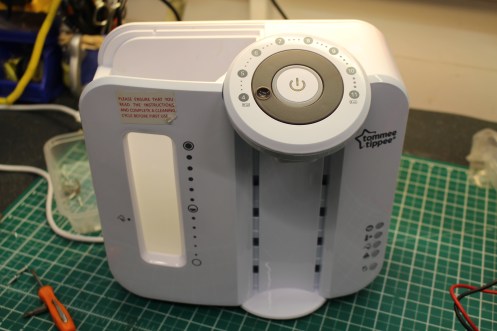
IMG_6428
FixItWorkshop, Jan’19, Worthing, Tommee Tippee Perfect Prep machine

After removing the back, I was presented with an electronic control unit, some solenoid valves and a heater, plus some other environmental sensors such as thermostats.  The plug fuse was OK, so it was time to check if power was getting to the machine.  It wasn’t.

This machine features a couple of power control devices; two  thermal aluminium ‘can-style’ fuses in-line with the heater, plus a thermostat on the output of the heater itself (to regulate heat).  After testing for continuity, it appeared that one of the can fuses had failed.

These fuses are common across a wide range of appliances, such as coffee machines, fans etc and are cheap, just a few pounds.  It could be that a temporary air-lock in the heater caused a hot-spot and therefore that excess heat caused the 172 degree fuse to pop.  It was worth a try to replace it and see what happened.

I replaced the fuse and re-assembled.  After filling with water and powering it up, normal service was resumed.

Since I replaced the fuse, the machine has been in continuous service for many months, so I can conclude that it was probable that the over heating was temporary.

I created a short video to help others who may have similar problems with their machine.

Cost of a new machine:  £90.  Cost of repair: a few quid and a few beers.
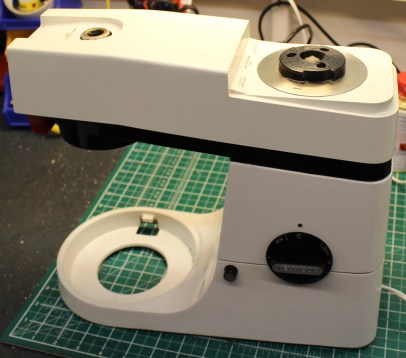


Another smoking Kenwood Chef A901E sorted in time for Christmas…just

Another Kenwood Chef gets the treatment in the Workshop

How about another Kenwood Chef story?  I know I’ve covered this machine a few times now, but I’ll try and make it as interesting as I can.  I just LOVE Kenwood Chefs.

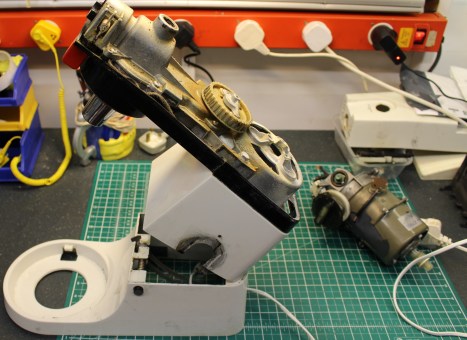
IMG_7700
FixItWorkshop, December’18, Worthing, Kenwood Chef A901E on the bench.

A customer got in touch with me via the FixItWorkshop ‘contact us’ link asking if I could fix his family’s much beloved Chef.  While last in-use, it started smoking and smelling terminal.  How could I refuse.  I’m located in Worthing, but the customer was based in North London, quite a distance for a repair and would have been usually cost prohibitive using the Royal Mail.  However, using local drop-off points, carriers such as Hermes and DPD offer (slightly slower) courier services for about £7.00 one way, which starts to make more fiscal sense.  This is what we did.

I wish I’d taken a photo of the box the Chef came in, because the customer had clearly gone to a lot of effort to make sure it was well protected!

On with the repair.

The Chef has been in production many years and although they can often appear similar on the outside, they do vary on the inside, depending on the year of manufacture as small tweaks and improvements are made.  Evolution, rather than revolution, usually the backbone of any successful design.

The A901E is different from the previous A901 as it features an electronic speed controller, rather than a centrifugal affair.  While the later design is an improvement, it wouldn’t deter me from buying an earlier model; the improvement is small.

The A901E still features similar components to previous models which can and do fail, especially with age.  The subject here is about 30 years old, give or take.

IMG_7678
FixItWorkshop, December’18, Worthing, A901E, motor removed.

The motor on the A901E comes out quite easily; first remove the motor cover, remove the mains cable (disconnect first of course), remove the top cover, belt, then the four screws holding the motor in.  The motor then pulls down from inside, out through the gap left by the hinge.  Easy.

The motor circuit board showed traces of component catastrophe with dust and dirt left by exploding components.  Nasty.  Pre-empting the fault, I ordered a repair kit before I’d taken the machine apart, together with replacement feet as the ones on this machine were knackered.  The kit includes capacitors, resistor and triac as these are the main components that tend to fail.

These kits are available on eBay and are worth the money as they are often cheaper than buying the components separately and they contain instructions for newbies.  Here’s a little slide show showing the process.

This slideshow requires JavaScript.


With the kit fitted, the motor re-installed, mains reconnected, the Chef ran well again, this time without burning or smoking.  However, all was not well as the speed control was a bit wobbly at lower speeds, which was just plain wrong.  Having worked on a good few Chefs, this problem is usually down to excess end-float on the motor spindle.  Working with the motor still in situ, the motor fan, which controls end-float could be adjusted with an Allen key.  Sorted.

Just the replacement feet to fit and after a quick clean-up, the Chef was reassembled, ready to go home.

A top tip for you.  If you intend to replace the feet on your machine and you probably should if they are old as they go hard or fall apart, then soak the area around the feet recesses with WD-40 or similar a day or so before as this will make getting the remnants of the old feet out, much easier.

Cost of a replacement:  £400 up.  Cost of repair:  £12.65 plus my time and tea.

Christmas blackout

A Christmas treat for me…

Christmas wouldn’t be complete without having to fix last years’ tree lights and this year was no exception.  It’s a tradition I look forward to and savour.

Gone are the days spending hours trying to find a faulty bulb, now due to the wide availability of cheap LED products, the thing that’s often likely to fail is the wiring, something which was much more unusual, a few years ago.  Manufacturers must make savings somewhere and I often wonder how retailers can offer new decorative lights, so cheap.  Compromises must be made somewhere I guess.

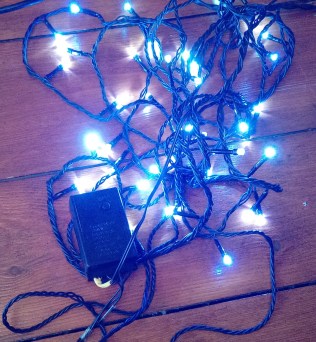
IMG_20181215_112843
FixItWorkshop, December’18, Worthing, Christmas Lights.

Being cheap, like a lot of things, makes them more disposable, which is a shame when things fail, often for trivial reasons.  This year’s blackout was caused by a couple of broken wires on the control box, which didn’t appear to have any obvious way to get inside.

We don’t like to be beaten in the workshop and sealed units and tamper-proof items are just seen as a challenge, rather than a deterrent.

Like many multi-function sets, the lights are operated via a control box with a switch, mounted in a plastic enclosure which appears sealed.  The fault was obvious here, just the main wire from the transformer had broken ‘flush’ with the control box, meaning that there was not enough wire either side of the break to re-join it.

The control box has no screws nor visible clips, holding it together, so it was time to break it open, using a small flat-bladed screwdriver.  The small section covering the wires snapped off cleanly, revealing several terminals covered in hot melt glue, annoyingly.  This meant that before any repair, the glue must be removed.  Several minutes picking this off with the screwdriver, revealed some conventional post terminals.  The fix was easy from there, just cut down the wire to make a new connection, remembering which way round they went, clean up the terminals and solder back together.  A little bit of fresh hot-melt glue to seal the connection and a bit more on the surface to be stuck together, and the cover was refitted.  I also fitted a little heat shrink to repair to reduce the chance of the cable from breaking again.

This slideshow requires JavaScript.

As I had the soldering iron out, I also did a small repair to the control box wire to transformer plug, which had also broken.  It was a case of cutting back two sides of the break, soldering, isolating with a small amount of electrical tape and sealing with heat shrink.

Now that’s all done, Christmas can now officially start.

Cost of replacement: £ 5.00 up.  Cost of repair: 1 cup of tea, heat shrink, tape and solder.


Hotpoint ‘Rumble’ Tumble Dryer VTD01

A noisy tumble dryer gets fixed cheaply

Strange noises from machines play on my mind.  None more so than when that niggling noise starts to get worse.  Noises like that usually mean two things.  Catastrophic failure and expense.

Time to disconnect from the mains and fetch the tool box.

The patient in the surgery this week is our own Hotpoint tumble dryer.  We avoid using it at all costs, but with miserable English weather and two children, getting washing turned around efficiently, ready for use is mandatory.  To be frank, I’d noticed the excess whinning bearing noise coming from the dryer for a few uses, but it was getting to the point where it was hard to ignore.

Electric hot air tumble dryers are pretty simple things.  They work by sucking cool air in, heating it up under thermostatic control and then blowing it in to a rotating drum.  The moist air is then expelled via a filter and then hose, to atmosphere.  Tumble dryer models of this kind will have the following:  A motor, heater, thermostat circuitry, timer and a drum.  There isn’t much to go wrong and many parts for UK tumble dryers are available, cheaply from places like eSpares.co.uk.  Usually, no special tools are required if you want to have a go at fixing your machine and I recommend you do of course.

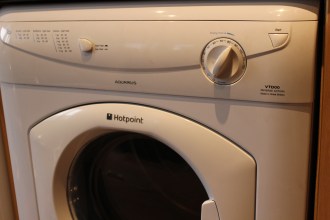
IMG_7419
FixItWorkshop, Worthing, December’18, Hotpoint VTD01 Tumble Dryer.

After opening up the cabinet, access to the drum and motor was available by the side panel which was held in position with several self-tapping screws and hooks.  Care must be taken if you attempt something similar on your machine since there are plenty of sharp edges to watch out for.  This dryer features an AC induction motor (which has no motor brushes).  It has a spindle which runs through the motor with a pully one side to drive the drum via the belt and a fan the other to blow the hot air.  Removing the belt and spinning the motor by hand revealed the problem.  The spindle spun OK, but sounded rough.

Replacement motors are available at a reasonable £90 or so, but you know me by now, I don’t like spending that kind of money, unless I have to.

The motor is attached to the appliance with simple bolts and is removed easily.  The motor is held together with self-tapping screws, which are easily accessible.  Just two bearings feature in this motor; one at each end to support the load.  Both bearings sounded rough, but seemed not to be worn too much.  The bearings are standard items and it would be easy to find exact replacements from a bearing supplier (rather than replacing the whole motor), for under £20.  However, as this was my own machine, I went for cheaper fix, to squeeze more life out of what I already had.  With the dust cover popped off from both bearings, I cleaned both with isopropyl alcohol cleaner and then re-greased with quality high-melt point bearing grease.  Much better.

This slideshow requires JavaScript.

The motor re-assembled, re-installed back in the machine and it was time to switch on.  It now sounded as sweat as a nut.

If and when the bearings get noisy again (and they will eventually), I’ll replace the bearings with new ones.

Cost of replacement:  circa £200.  Cost of repair:  My time, two cups of tea, one custard cream, a bit of grease.  Not in that order.

Non-starter: Pure Evoke H2 DAB radio

My own radio gets the workshop treatment.

Who wouldn’t love a new DAB radio for your birthday?  Well, that’s what I had this year and I was thrilled to receive this Pure Evoke H2.  After choosing a suitable location on my desk, I quickly unpacked it, plugged it in and…nothing.  Booooooo!

The display backlight appeared to glow a little, but that was it and I was missing Today on Radio 4.

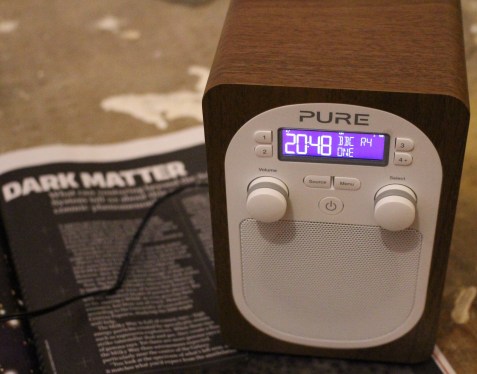
IMG_7657
FixItWorkshop, Worthing, November’18, Pure Evoke H2 DAB radio.

To save a quite frankly dull story, the returns and replacement process offered by the company who supplied the radio was hopeless.  But, after 2 months, I ended up with a replacement radio, in addition to the one I already had.  The second radio worked, albeit with some fettling required to the speaker to make it sound ok (another story).

Time to dig out the screw drivers as I had nothing to lose.

Just 6 screws hold the back on and with these removed, the radio’s innards were exposed.  Now, I’ve made radios from kits in the past using components I can hold with my fingers, but with this radio, the circuitry was teeny-weeny and I would have to have some luck to fix it.

I was in luck.  The radio is made up like a sandwich.  The front fascia is screwed to the cabinet and the back, that I’d removed, was screwed to the cabinet, from the other side.  There are data-style cables between the two halves and one of them appeared to be loose.  I carefully pushed the connector ‘home’ and then re-applied the power lead and wouldn’t you know it, the display lit up and it burst in to life.  Now we’re talking.

Thinking I’d sussed it out, I screwed the radio back together and had about a week or two of unbroken service, until the screen froze and then nothing. Oh no.

Re-opening the back of the radio, I suspected that the tiny soldered pins on the back of the multi-way connectors on the data-style cables, had been dislodged.  I have average sized hands for a bloke, but I needed tweezers to get the connectors on during assembly.  I wonder how much it would have cost to add an inch or so to each cable, to make manufacture easy.  As a consumer, I would have gladly paid the extra penny.  I suspected that this is how the original fault came to be as it wouldn’t have taken much more than a shove in the wrong direction to break the delicate connectors, due to the short length of the internal cables.

This slideshow requires JavaScript.

Since this circuit board is a tiny stamped component affair, I had to be quick and neat with my re-soldering.  Each pin to PCB connector re-soldered, cables re-attached, back screwed back on and the radio worked once more.

Pure have a reputation for easy to use, excellent sounding products.  It’s just a shame they have seemingly penny-pinched on some of the internal gubbins on this model.  If yours develops similar symptoms, don’t give up, take the back off and have a look.

Cost of a new radio:  £40-90.  Cost of repair:  5 mins tinker time, one cup of tea.

Classic (asthmatic) Dyson DC01

A tired DC01 gets some TLC

Starting a new job is always fun and when a new colleague of mine mentioned that the office vacuum cleaner had packed up, I rose to the challenge.

I’m quite fond of Dyson products as some of you know, mainly because:

  • They’re well-engineered, by engineers
  • They’re designed to be repaired easily with simple tools, which is better for everyone
  • Parts are readily available at reasonable prices

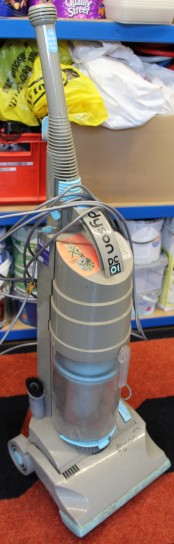
The DC01 was launched in the early 90’s and was Dyson’s first market clean-up, competing with the established market leaders.  Although this machine is over 20 years old and Dyson no longer supports it directly, reasonable quality pattern parts are available on eBay.  If you have one, love it and keep it going.

IMG_7425
FixItWorkshop, Worthing, November’18, Dyson DC01

This one is actually an ‘Antarctica Solo’ model (grey and light blue instead of yellow), which commemorated Sir Ranulph Fiennes’ solo trek across Antarctica and raised money for Breakthrough Cancer.  It had been abandoned and was moments away from the skip.  I felt quite sorry for it.

Faults reported included; no suction, excess noise and smell!

The first thing to check on the DC01 is the filters, as like many other Dyson products, people forget to clean or change the filters.  Both filters were totally choked and full of all sorts of detritus.  A quick shake out and wash with warm soapy water and they were as good as new.  Following that, I inspected the seals around the join between the cylinder and the main body.  All the seals were dirty, so a clean up and quick spray with silicone spray and they were as good as new.  Great.

The noise seemed to be coming from the front beater/ rollers which usually means, noise bearings.  The beater on this model uses a two bearing set up.  One was fine, but the other was seized.  As I didn’t want to spend any more than I needed, I cleaned the bearing, after removing it and the dust cover, re-greased it with LM High-Melt Point grease (general automotive stuff) and it was ready to roll and beat again.


This slideshow requires JavaScript.

Once the filters were dry and re-installed, the Dyson ran like new again.  Very satisfying.

Cost of replacement:  £15 second hand, £100’s for an equivalent-ish new model.

Cost of repair:  Patience, washing up liquid, two cups of tea.

Silent Singer Sewing Machine Pedal

A classic Singer foot pedal gets repaired.

My mum’s got an old electric Singer sewing machine which is about 40 odd years old.  Singer sewing machines are well supported generally and parts are readily available, but I find it’s sometimes fun to try and find the cheapest way to fix something myself.

IMG_6870
FixItWorkshop, Worthing, November’18, Singer Sewing Machine Foot Control Pedal

The foot pedal on this machine went pop and smelled horrible after.  The machine then stopped working, oh dear.

The pedal is of high quality construction and easily better than any generic replacement on the market, so it was definately worth saving.

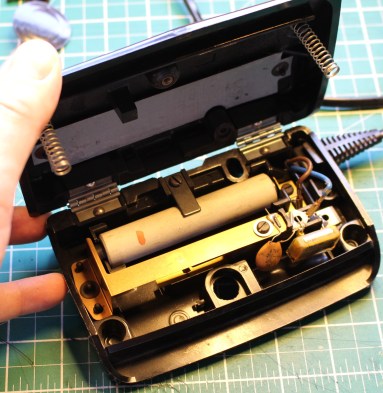
Opening up the pedal was just a few screws, which then exposed the whole mechanism.  The mains resistor was in tact and seemed to test with resistance.  A good start.  The contacts were in good condition as was the rest of all the components, except for the mains input capacitor, which has spectactularly failed and split open, a common problem on older mains capacitors.

Repair kits are readily available for about £5, but that seemed expensive to me!  Using the existing capacitor as a guide, I found a suitable component on eBay for £2.09 delivered.  That’s more like it.

The capacitor I used was:  Film Capacitor, 0.1 µF, 250 V, PET (Polyester), ± 5%, R60 Series (from eBay).

Here’s a little slide show that I hope will help others fix their pedal, should it fail.

This slideshow requires JavaScript.

With the old capacitor cut out and the new one soldered in, the pedal was ready to run again.  Sorted.

Cost of a replacement:  £15-30 for a generic part.  Cost of repair, £2.09, 1 cup of tea.

Elna SP foot pedal went bang

Elna SP foot pedal to the metal

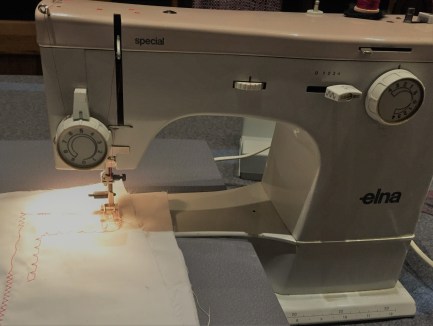
On the back of a previous article about a repair I did on the rather wonderful Elna SP sewing machine, a reader got in touch.  She was a genuine sewing aficionado and had several top of the range current machines, but she used the trusty Elna SP for many smaller jobs, where the other machines didn’t quite cut it.

All Elna SP machines are getting on a bit and parts are either re-manufactured, scarce or secondhand, if you can find them.  Having said all that, a well-maintained Elna will run for many years and last much longer than new metal on sale now.

IMG-1971
FixItWorkshop, Worthing, November’18, Elna SP Special, in action

The foot pedal on this machine had gone pop, bang, finito.  It smelled terminal.

Knowing that parts for this machine are rarer than hens teeth and I do like a challenge, I took on the job.  I’m based in Worthing, West Sussex and the machine was located in Scotland, so after a short wait, the knackered pedal arrived in the post.

The pedal is held together with four small self-tapping screws and came apart easily.  The reason for failure was two-fold.  The copper leaf contacts had arced excessively and caused major pitting in the contact strip (see slide show) and the probably ensuing resistance had caused the main resistor to overheat, causing the winding to fail.

This slideshow requires JavaScript.

The contact surfaces were easy-ish to fix, or rather breathe new life into as all they needed was cleaning and re-shaping.  The resistor was a bit trickier to mend.  Getting hold of a replacement was going to be near impossible, so the only thing to do was to try and repair it.  Without that particular style of resistor, of that value, it wouldn’t work again.  Luckily, there was some excess resistance wire on the thing and I managed to twist it in to the broken section.  Soldering was not an option, since the wire was an alloy that wouldn’t take to solder and in any case, these things get hot in normal service.  I twisted both ends of the break to form a new section, while maintaining the same length of windings on the resistor, essential if I was to match or get close to the original specification.  Difficult.  Luckily, after a few goes, I managed it and the applied a little heat-conducting (and therefore dissipating) paste to the join.

With the pedal reassembled, I was only able to test it with my meter, since the sewing machine was far too heavy to post.  The pedal tested as a closed circuit (OK), which was a result.  I then had to wait for the pedal to be collected, taken back to Scotland and tested.  Fortunately, my fix worked and the machine sprang in to life, without a hitch or missed stitch.

Now, a word of caution with this one.  This is NOT the best way of mending something like this and all I’ve probably done is prolong it’s life a little longer.  There are generic sewing machine pedals that would work with this machine and will be fine, when this one fails in future, but that’s not the point.  The main thing is that something that was broken is now working and even if it’s not the best fix, at least it will run for a bit longer.  Happy days.

Cost of replacement: (generic part) £15-30.  Cost of repair, my time, a bit of solder and several cups of tea.

Alesis (DM Lite) Drum kit without kick

Alesis Drum Kit gets a cheap repair.

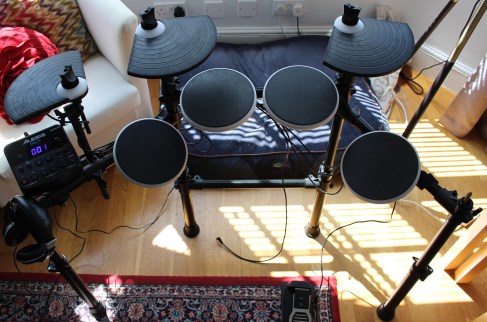
A neighbour of mine is a talented musician in a local band and also teaches school children various instruments.  Some of his students learn the drums, which is most parent’s nightmare as any notion of a peaceful evening is shattered.  Luckily, electronic drum kits are an excellent way to learn with headphones, while keeping happy parents and neighbours.

IMG_5963
FixItWorkshop, Worthing, November’18, Alesis DM Lite Electronic Drum Kit
IMG_5964
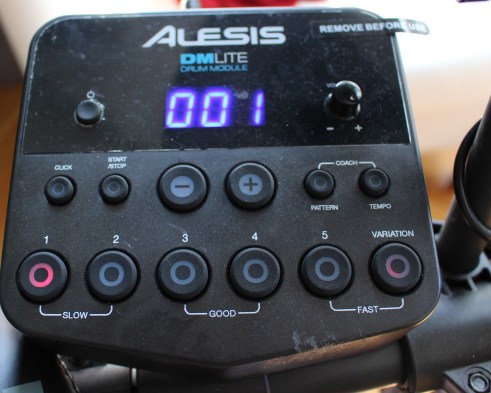
FixItWorkshop,  Worthing, November’18, Alexis DM Lite main drum module

This kit was missing several beats and was hampering learning, so time for a visit to the workshop.  I’m no musical instrument repair specialist, but I thought that the drum kit must use electrical contacts, switches and rudimentary electrical components and I was right.

Two faults were reported; The kick/ foot pedal was intermittently not working and one of the drum pads was hardly working at all, unless you hit it with a sledge-hammer.  Time to see what was going wrong.

First up was the faulty drum pad.  Opening up the back of the pad was simplicity itself, just a few screws held the back to the pad.  Sandwiched between two halves was a sensor, a bit like a piezo flat speaker, similar to the type found in many toys with sounds.  I guess the principle here is that vibration detected by the piezo sensor is converted to analogue variable voltages by the drum kit’s circuitry.  While apart, I noticed that some of the copper detail tracks on the printed circuit board which had a standard 3.5mm jack socket (to allow a connection back to the rest of the kit) had cracked.  Looking again through my magnifying glass revealed quite a bit of damage, probably as a result of many Keith Moon wannabes.  Testing these tracks with my meter confirmed an intermittent fault, so out with the soldering iron, to repair the connection.  Plugging the pad back in, it was ready once again for more drum solos.

This slideshow requires JavaScript.

Next up was the dodgy kick/foot pedal.  As the with the drum pad, the pedal would cut out intermittently.  A few screws held the pedal together, so only basic tools required.  See the slide show below for an idea of the construction.

This slideshow requires JavaScript.

The fault with the pedal was similar to the drum pad.  Some of the copper detailing around the 3.5mm jack socket had failed and required some careful soldering.  I say careful, as applying too much heat at once would, likely as not, melt the casing of the socket.  One had to take care.

Once soldered, the pedal was much better.  I didn’t get a full 10/10 repair with the pedal since I think there was wear on the kick sensor, but it was an improvement none the less.

Cost of replacement:  £lots.  Cost of repair, my time, two cups of tea and some solder.


Re-vamped Micro Mini Scooter (just for fun).

A Micro Mini Scooter repair, just for fun!

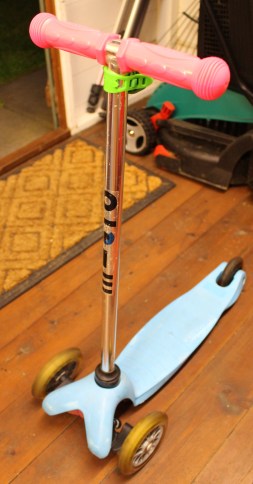
I really had no idea that Micro Scooters have been a ‘thing’ for the last few years and as a result, there are lots to choose from on the second-hand market.  We picked up a ‘bargain’ for our oldest daughter for a princely sum of £5.00 via a local Facebook For Sale page.  With hindsight, it was overpriced.

Just about every part of the scooter was either nasty or plain broken.  The handle bar grips were missing, the wheel bearings were all shot to pieces, the steering mechanism seized and the rear brake was missing.  The back brake on this scooter type, I’ve since found out, have a habit of snapping off with hard use, so that should have been the clue to the low, low price.  But if you read these pages, you know me, I like a challenge.

First step was to address the static wheels.  An Allen key holds the wheels on to the stub-axels at the front of the scooter and there’s something similar on the trailing wheel.  The bearings on our wheels were beyond a re-grease as they’d appeared to have spent their entire life at the bottom of The Channel.

This slideshow requires JavaScript.

Luckily, the bearings are easy to replace and good-quality generic items are available on eBay for under £5.00 for a whole set (6 bearings, 2 per wheel).

Next came the handlebar grips.  Ours were missing and again, generic ‘copy’ grips are available on eBay which are perfect for the job and are half the price of the original equipment.  While I was shopping on eBay, I also found an original Micro Scooter bell.  Just the job.

IMG_5715
FixItWorkshop, May’18, Micro Mini Scooter, new handlebar grips and bell fitted, prior to painting.

The steering mechanism was next and all it needed was a good clean up and light lubrication with some plastic-friendly white PTFE grease, readily available from Toolstation.

This slideshow requires JavaScript.

The shabby foot plate area was once baby-blue but had since faded and had evidence of scrapes.  It looked a bit sorry for itself.  I decided to address this by giving surfaces a good clean up and then key with wire wool.  A couple of coats of good quality plastic primer and then a couple of coats of vinyl black paint, which now gave the scooter quite a ‘presence’.  I then decided to improve the foot plate ‘grippy-ness’ by applying a custom grip tape design.

This slideshow requires JavaScript.

Before re-attaching the foot plate back to the chassis, the brake needed to be replaced.  As with some of the other fixings on the scooter, the brake’s fixings were so rusty, they needed to be drilled out and replaced.  Luckily the new original equipment brake came with new improved fixings which fitted perfectly.

This slideshow requires JavaScript.

Thanks to the cool dudes at Alleyoops, Worthing for their help and advice www.alleyoopsskates.co.uk.  The UK Micro website is also very good as it lists spare parts www.micro-scooters.co.uk/spares-support.

Micro Mini Scooter (AKA ‘Triggers Broom’) renovation spend, May’18:

New good quality bearings                                                        eBay                      £4.15

Generic copy Micro Scooter handlebar grips                         eBay                      £9.75

Genuine Micro Scooter bell                                                        eBay                      £7.78

Paint and sundries                                                                        Shed                      £2.00 (approx.)

Grip Tape (customised to fit)                                                       Alleyoops            £8.00

Genuine Micro rear brake                                                            Alleyoops            £8.99


Total                      £40.67

I know what you’re thinking… for £40 more, I could have bought a brand-new scooter and saved myself the bother.  At times, I did question my own sanity.  But what we now have is a perfectly serviceable, one-off that no one else will have.  Can you put a price on that?!