That thing just eats money!

Tomy (UK) /Robie (US) Mr. Money repaired in the Workshop

I have a real soft spot for novelty toy robots that actually do something.  I think I’ll make a point of collecting more.
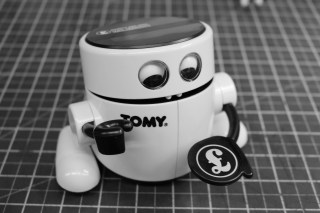
IMG_9795
FixItWorkshop, Worthing, August’19, Tomy/ Robie Mr. Money.

Make and model:  Tomy (Robie in U.S.) Mr. Money  children’s money box

Fault reported: Not eating money

Cost of replacement:  N/A

Cost of parts:  £0.00

Hours spent on repair:  About an hour

Tools needed:  Cleaning cloths

Sundry items: Contact cleaner

Repair difficulty:  3/10

A lady got in touch with me on the back of an article I wrote a while ago about a faulty Mr. Money toy robot money box.  My Mr. Money had gone wrong as I’d left an old battery inside which had then leaked.  A major clean-up and tinker was then required to get it working again.

This particular Mr Money belonged to the lady’s husband and was to be ‘given to him again’ as a 40th birthday present.  What a nice thought.  The only problem was that Mr. Money had stopped working long ago; put away and forgotten about.  He needed bringing back to life.  Perhaps there was a hidden message to the husband to save for something?  Who knows.
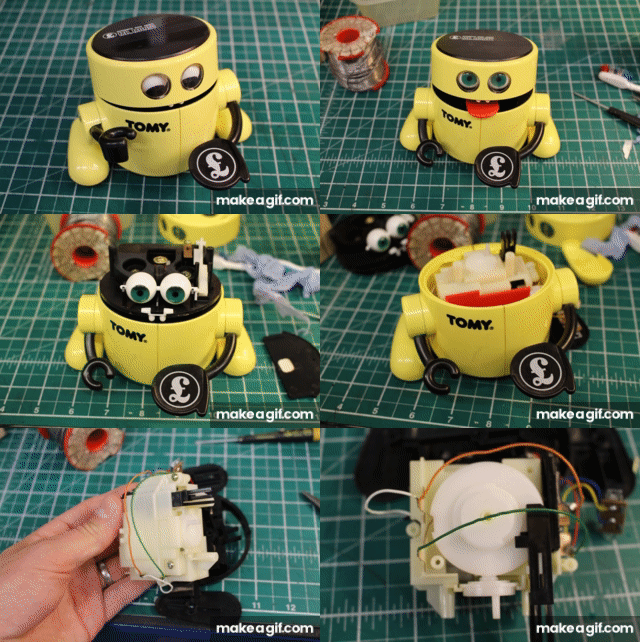
Mr_Money_Quick_Strip

Mr. Money arrived well packed at the workshop and I wasted no time in taking him apart.  There was no evidence of battery leakage or accidental Cadbury Button ingestion and he was generally in good condition with no bits broken off.  A good start.

Mr. Money is getting on a bit and when taking apart any toy, let alone one that’s over 30 years old, one must be careful not to accidently snap-off any lugs or tangs that hold things like casing and levers together.  Very tricky.  It’s not something I usually attempt after a day at work, when I’m shattered.

After some rooting around in the depths of the mechanism, I noticed that the ‘limit switch’ was a little dirty and that some of the contacts needed a little clean.  Using some fine cloth and switch cleaner, all metallic switch surfaces and battery connections were cleaned up and with a new AA battery installed, Mr. Money worked again.

Being 30 years old, there’s no silly use of electronics or other USB excesses which are, I think, ‘over used’ on modern toys.  It all adds up to something which can be repaired with basic tools and parts.

This slideshow requires JavaScript.

I carefully reassembled the workings, casing, switches, arms, head, eyes and lid.

Mr. Money was ready to feast.

After testing a couple of quid through the Mr.Money’s eating cycle, I was happy for him to start his journey home.  I hope he gets used regularly and never put away in a box again.


Tone-deaf VTECH Singing Nursery Rhyme Book

VTECH kids toy gets a little help.

We love a musical singing book toy, don’t we.  They’re great for encouraging children to form words, read and follow a narrative.  We have a few of these and they’re all great fun, all the time the batteries hold up.

We’re not so fond of musical books when they seemingly start by themselves, at one o’clock in the morning, when there’s no one else in the house.  Very creepy.

Make and model:  VTECH Electronics Singing Nursery Rhyme Book

Fault reported: Poor sound quality

Cost of replacement:  N/A

Cost of parts:  £0.00

Hours spent on repair:  About 10 minutes

Tools needed:  Small file, cleaning cloths

Sundry items: Contact cleaner

Repair difficulty:  1/10

IMG_9559
FixItWorkshop, Worthing, July’19, VTECH Singing Nursery Rhyme Book.

This toy was a hand-me-down and had enjoyed a few years of use already, before it came in to our household, but it was in good condition and still has many more years left in it yet.

Recently though the singing emanating from the book was becoming a bit off-key and to be frank, rather than bringing joy the noise coming from the toy was enough to induce nightmares.  I keep a ready supply of rechargeable ‘AA’ batteries in this house and after popping out the old ones, the new ones fitted, I assumed all would be well, but not so.

Despite fresh power, the singing was still horrible and wobbly.  A quick test of both sets of batteries (old and new) revealed that the original batteries were fine and that something else was at play.

Time to delve a little deeper.

Galvanic corrosion can occur when two different metals in close contact with each other, chemically react.  The corrosion forms a barrier, in this case between the electrical contacts of the toy and battery to form a resistance.  This means that the toy, with the corroded contacts, wouldn’t get the full power it needed.

There was some minor corrosion on the contacts that needed a quick clean with some cloth and contact cleaner, something I keep on the shelf for such an occasion.

This did the trick and with the original batteries fitted, the toy was back on song once more, ready for another performance.

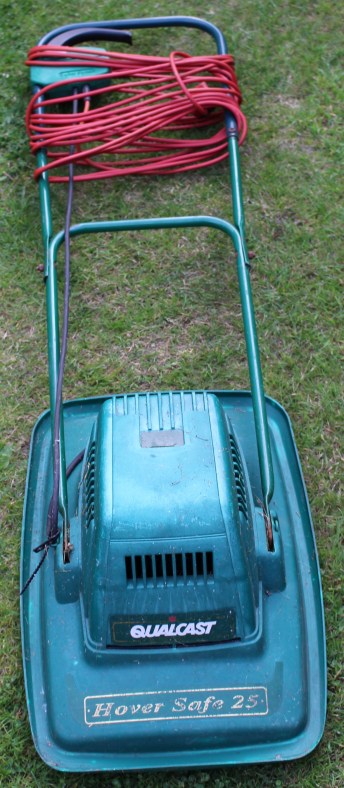
Qualcast Hover Safe 25, left out in the cold

An old hover mower avoids the great lawn in the sky.

Another email popped in to my inbox asking if I would have a look at a Qualcast Hover Safe 25 which had stopped working.  It had been working intermittently for a while before giving up the ghost and now it had thrown in the towel.  Bad news.  It had literally been kicked into the long grass.

Make and model:  Qualcast Hover Safe 25

Cost of replacement:  £40.00 (ish)

Cost of parts:  £0.00 (plus my time)

Hours spent on repair:  1 (plus testing)

Tools needed:  Basic screw drivers, multimeter, pliers, hair dryer

Sundry items: WD40, silicone spray, wet and dry sanding cloth

Repair difficulty:  4/10

IMG_9652
FixItWorkshop, Worthing, June’19, Qualcast Hover Safe 25.

The owner of this mower had reported that the handle mouted switch (dead-mans handle) had been a ‘bit tricky’ to use and that it didn’t always work.  These kinds of statements make me wonder what kind of life a device has had.  Judging by the rust and discolouration on the metal and plastic parts, I think this mower had been left in a shed with a leaky roof!

This slideshow requires JavaScript.

The water had not been kind and the mechanism had seized.  The only thing to do was to open up the switch, clean up any moving parts, lubricate the switch with switch cleaner and lubricate the sliding plastic parts with a little silicone spray.  The small lever which actuates the main on/ off switch was also slightly bent, so after a little straightening, using a hair dryer, it was as good as new. After the switch was repaired, the lawnmower’s motor still wasn’t working.

The cable running from the switch to the motor housing appeared to be in good condition, so the only thing left was to remove the motor itself.  Removing the motor means removing the blade and 4 small screws (see photos).  Once exposed, the motor was revealed.  Power was indeed reaching the motor when the switch was operated, as confirmed with a quick dab of the multimeter.

The motor itself seemed to have little resistance when manually spun, which led me to suspect the motor brushes had worn out.  Doubting that brushes were available, I decided to remove them anyway for closer inspection.  This revealed seized motor brushes, which backed up my theory about the mower’s damp environment.  A quick bit of jiggery pokery and a clean up and the motor brushes were as good as new.  A quick clean up of the motor commutator, I refitted the brushes and the motor was ready to be refitted.

Now, this mower is not in the first flush of youth and the motor bearings were a little noisy, but after a quick spray of grease in the bearing area it sounded fine.  The mower will never be perfect, but at least it will work for a little longer, which has got to be the point, hasn’t it?

Dyson DC25 with various problems

Another Dyson dodges the dump

An email dropped into my inbox about a poorly Dyson DC25, that needed a bit of a clean up.  I said no problem, I’ll take a look.  What turned up was a vacuum cleaner that needed a bit more than a quick clean up with a J-Cloth.

Make and model:  Dyson DC25 (blue/ grey)

Cost of replacement:  £N/A, price when new £300

Cost of parts:  £6.89 (plus my time)

Hours spent on repair:  2.5 (plus testing)

Repair difficulty:  5/10

It soon became apparent, that the Dyson was quite ill.

Here’s a summary of the problems:

  1. The mains cable flex was split, exposing the internal cables risking electric shock
  2. The roller beaters would not spin
  3. Suction was limited

None of these features were useful in vacuum cleaner, so out came the screw drivers.

The mains flex damage was about 90 cms from the handle end, so rather than replacing the whole cable at about £30, I decided to shorten the one already fitted on the Dyson.  This involved removing three screws on the reverse of the handle to expose the wiring.  From there, the broken flex could be cut-out and the sound part of the flex, reattached to the Dyson’s wiring.  See below.

This slideshow requires JavaScript.

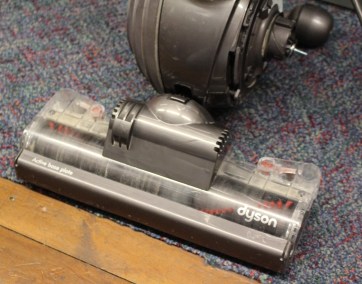
The DC25 features a roller-ball, enabling the beater head to twist and turn in to tight spots on the floor.  This means that mains power must navigate the various joints and hinges on the way from the main body to the roller beaters.  A quick test revealed that the power was not getting through.  After removing one of the side covers, there was evidence of a previous repair.  One of the mains cables had broken and had then been twisted back together.  Clearly, an improvement was needed.  Using a section of repair cable, a small joint was soldered back in to place with some mains-rated heat shrink around the connection for insulation and reinforcement.  See below.

This slideshow requires JavaScript.

The beater head also needed a good clean, which meant a strip-down and re-build.  All parts were cleaned, inspected and reassembled.  During that process, a small break in the beater head wiring was found, repaired and put back together.  See below.

This slideshow requires JavaScript.

Finally, the machine needed a good clean up.  The main cylinder was washed, the filters washed (although I later decided to replace these) and the main seals on the vacuum system, cleaned and silicone sealed.  See below.

This slideshow requires JavaScript.

During clean up, the spigot-yoke that holds the roller ball in place on one side was found to be missing.  Luckily the owner had kept this and dropped it back to me to re-fit.

This Dyson was on the brink, but with a little bit of spanner-time, it’s now ready to serve many more years.


Cold GHD hair straighteners

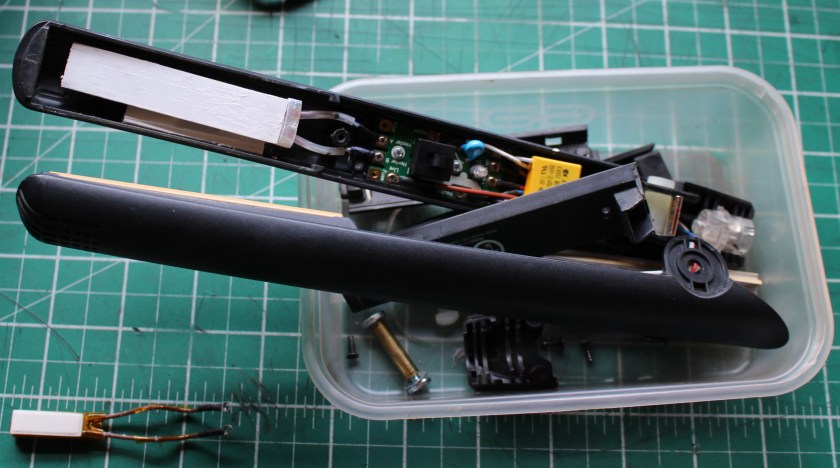
GHD 4.2b hair straighteners with a new fuse.

Someone got in touch with a set of GHD 4.2B hair straighteners, which wouldn’t warm up.  Not even the light would come on.

Make and model:  GHD 4.2b hair straighteners

Cost of replacement:  £85.00

Cost of parts:  £2.89 (plus my time)

Hours spent on repair:  1 (plus testing)

Repair difficulty:  5/10

IMG_9120

 These older hair straighteners are well supported with spare parts and their design means that, with a systematic approach and basic test gear, the fault can be identified and parts replaced, fairly easily.

The thermal fuse on these straighteners can fail, even though the heating elements and associated wiring and circuitry is just fine.  A combination of age and accidental rough handling can affect the life of the fuse, so it was the first thing I checked on these straighteners.

It was first time lucky in this case.  The fuse tested open-circuit.  To prove that the rest of the circuit was working, I made a temporary short circuit to the fuse connection and the straighteners powered up OK.

Time to order a new fuse.  Using an eBay shop (SiriusHairUK), a fuse was ordered and it arrived very quickly, great service.

This slideshow requires JavaScript.

With the fuse re-fitted and the heating element re-installed the rest of the hair straighteners were ready for reassembly.  Using basic tools, the straighteners went back together well and after final testing, they were ready for use again.

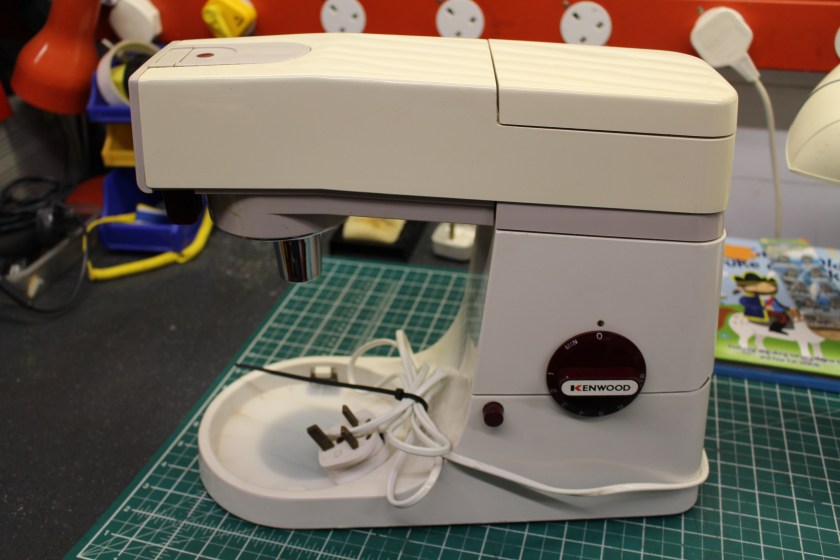
Smoky Kenwood Chef A901E

Another Chef enters the workshop with a smoking habit that’s hard to kick.

Top tips for keeping your Chef running smoothly, for longer:

  • Keep all moving parts free from dirt and old cake mix
  • If the feet are squashed, change them.  The gap allows airflow to the motor
  • Keep the hinge mechanism lightly lubricated
IMG_9144
FixItWorkshop, Worthing, May’19.  Kenwood Chef A901E (1980’s model)

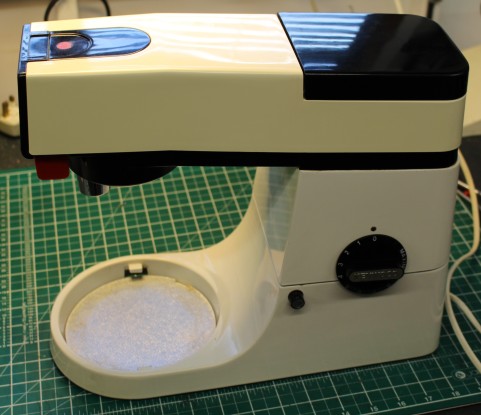
This A901E Chef had a developed a smoking habit.  Due to age, one of the capacitors had failed on the speed control circuitry making a lot of smoke while in use.  An adjacent resistor had also split in half during the failure.

Despite a smoky situation, there was hope for the Chef.

Removing the motor on these mixers is pretty straightforward.  Just remove the blender accessory power take off cover and remove some screws.  Lift up the top half of the mixer on the hinge and you’ll get access to the base of the motor area.  After you’ve removed the belt, the motor should come out.  There’s a bit more to it actually, but there isn’t much holding that motor in.

The later A901E features a better speed control circuit than the earlier A901 and it’s also made on proper circuit board, rather than just soldered-together components.

With this machine, the correct repair kit was obtained and fitted, so the circuit was as good as new and wouldn’t smoke anymore.

I treated this Chef’s motor to new motor brushes since the old ones were worn.  I also fitted new feet, as the existing ones were squashed and one was completely missing.

I was about to sign the job off , when I noticed a small tear in the outer cable flex.  I couldn’t let the Chef out of the workshop like that, so I had to replace it with a new piece.

This slideshow requires JavaScript.

After some fettling, the machine was running like clockwork, once again.

Cost of replacement:  £000s.  Cost of repair:  £12.74 plus my time and several ginger nut biscuits.

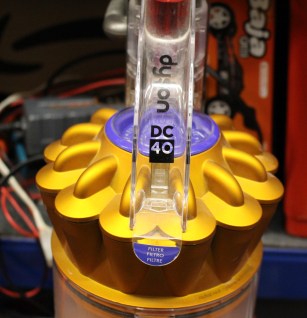
Dyson DC40 missing a beat

A small repair on a Dyson DC40 leads to a big improvement.

A powerful, easy to manoeuvre vacuum cleaner, that gets into every nook and cranny.  But not this one.

IMG_8891
FixItWorkshop, Worthing, May’19, Dyson DC40.

Three top tips for keeping your Dyson DC40 in rude health:

  • Keep all filters clean (wash or replace frequently)
  • Clean all rubber seals with a damp cloth to remove dust build-up
  • Occasionally lubricate moving parts of jockey wheel mechanism (springs and lever) with silicone spray

Do these things and your Dyson will love you forever.

I’m a bit of a sucker for Dyson products.  They are well engineered products from the school of function over form and in my opinion, objects of art.

This Dyson wasn’t very well when it was admitted to the workshop.  The owner had complained that the vacuum cleaner wasn’t picking up dirt and dust properly.  The beaters were not spinning either.

IMG_8890
FixItWorkshop, Worthing, May’19, Dyson DC40 beater head.

The beater ‘head’ is attached to the main body of the vacuum cleaner and is held in place with a sliding clip.  The head can rotate and move to allow maximum control.  The beater roller is driven not via a belt from the main motor, but from its own smaller motor in the head unit.  So, there is an electrical connector between the main body and head unit.  As the beaters were not spinning, it seemed sensible to test the electrical connection.  Upon testing, it was not working.

The mechanism on this vacuum cleaner is quite complicated and relies on levers and joints working in harmony.  Dismantling the wheels, filters, brackets and covers around the motor revealed the problem.  The supply that feeds power to the beater head is routed around the motor and sliding lever mechanism and a broken cable was to blame for the beaters not spinning.

Access was difficult due to the design so rather than completely tearing down the body to replace the supply loom, I reattached the broken wire with some soldering and heat shrink to make a robust repair.

After carefully rerouting the cables and reassembling the body, wheels and beater head, the beaters spun once more.  Result.

This slideshow requires JavaScript.

After a new set of filters were fitted and a light service, the machine was as good as new.

Cost of replacement machine:  £000’s.  Cost of repair parts: £11.69 plus my time and two teas.

Kenwood Chef repair: Real time video

A Chef repair gets it’s own video!

I carry out a few Kenwood Chef repairs a year and usually, they can be brought back to full health with simple tools and repair components.  I’ve not had a faulty Chef brought in to the workshop which hasn’t left ready for service.  Yet.

img_7876
Fixitworkshop, March’19, Kenwood Chef A901 with a repaired motor.

One common theme with all older machines is that the motor speed control circuitry can fail which either manifests itself with symptoms including, but not restricted to; electrical burning smells and smoke, the motor not running smoothly or not running at all.  While the failure of a Kenwood Chef may look spectacular when it happens, the repair is fairly straightforward, if you have some basic skills, tools and some patience.

This particular A901 came in with four faults; poor feet condition, cracked cowling, the speed control knob was loose and once I opened up the motor unit to look further, burned-out capacitors.

To some, this list of faults might seem a bit daunting, but it’s standard fare on a Chef of this age and to be expected after thirty plus years service.  Due to the excellent design of the product, the faults are all repairable with commonly available parts.

After about an hours’ work, the feet were replaced, the motor circuitry repaired and the replacement cowling refitted.  The speed control knob had come away from the motor body and only required the pin that held it in place ‘pressing’ back in to the housing, resulting in one happy mixer.

One of my aims on this website is to share my experience and best practice so for the first time, I made a video of the complete motor repair in real-time.  So, if you have a Chef to repair and twenty minutes, grab yourself some popcorn, a notepad and pen and enjoy.

Cost of replacement:  £150.00 and up.  Cost of repair: £30 plus my time and tea.

Karcher WV50 avoids the bin, just

An alternative, cheaper, motor fix.

My dad donated a rather sick Karcher WV50 window vacuum, water sucky-uppy-thing which he’d taken half way to the bin before thinking, I know, I’ll give it to Matt.

How thoughtful.

IMG_5930
FixItWorkshop, March’19, Karcher WV50 Window Vac, in bits.

The vacuum sucky-uppy-thing worked of sorts, but when operated, made a noise not to dissimilar to a distressed cat riding a trolley with wobbly wheels, if you get what I mean.  I wish I’d recorded it.

Anyway, opening up the WV50 was pretty straightforward.  Just several crossed-head screws held the two plastic halves of the unit together, revealing a simple electronic board, battery, switch, motor and fan with exhaust.

The principle of the WV50 is the same as any other domestic vacuum cleaner.  A fan drives air in one direction through a smaller hole (exhaust) creating a vacuum, in this case at a small wiper blade for glass cleaning.  Water is then drawn towards the fan, with the vacuum created and then diverted to a holding tank, for emptying later.

The tank on this product is quite crude and I suspect that should it be knocked over, the water within the tank could spill over in to the exhaust and in to the motor.  This is what I suspected had happened and caused the motor bearing on this device to wear excessively, causing the noise.

The cost of a motor and fan replacement on the WV50 was about £30.00 (where I saw them listed) but this would make the repair un-economical.  After an email conversation with Mabuchi, the makers of the motor, the original equipment K-280SA-3525, unique to the WV50, was no longer being made.

I don’t like being ‘beaten’, but having spent far too much time with batteries, bulbs and motors as a child than is entirely healthy, I realised that the casing and bearing on the K-280SA-3525 was pretty standard fare and if the spindle on our motor was OK, then all that would be required would be a new bearing.  It turned out that the spindle and motor brushes were OK, so I ordered a same size motor from eBay, via a very efficient and friendly Chinese electronics specialist with the intention of swapping the motor body and bearing over.

The motor arrived quickly and the transplant only took a few minutes.  Once reassembled, the motor and fan sounded like new once again.  A nice cheap fix, to keep this vacuum cleaning windows for another day.

I even made a short video, showing what I did.  Enjoy.

Cost of replacement: £50.00 (equivalent model)  Cost of repair: £1.50, some international emails and a couple of cuppas.  Nice.


A Challenge Circular Saw

A tool gets saved from the bin!

I had a slightly unusual request to do a ‘bit of soldering’ on a circular saw recently.  As I’m not one to say no to a broken item, I said “yes, I’ll have a look” as I was intrigued.

IMG_8361
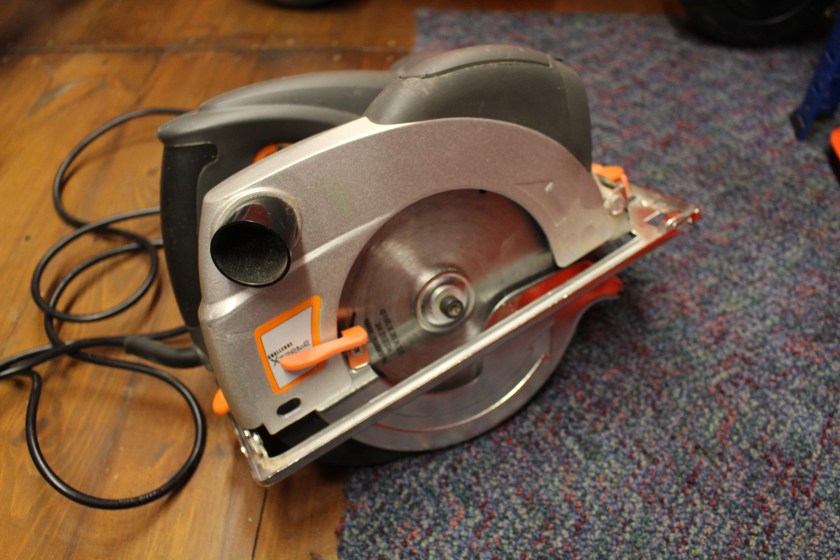
FixItWorkshop, March’19, Challenge Xtreme Circular Saw.

This Challenge Xtreme Circular Saw was working fine, but the spring-loaded safety guard had split at one of the ends and was now dangerous to use.

I guess this saw was originally sold at the ‘budget’ end of the market and some of the materials used on it were light-weight to say the least.  But having said all that, for light use, this saw was a very good tool with features like a laser to guide cutting.

The guard was made of a ‘mazak’ style alloy, which would have been pressed together at the factory and therefore quite difficult to re-attach.  Definitely not for soldering, welding or brazing.

I could have used a chemical metal compound as a glue or even epoxy resin, but in the end, I opted for making a simple couple of neat drilled holes with a small cable tie to bring the separated halves together, a neat mechanical and cheap fix to get the tool usable once more.  Sometimes, simple is best.

This slideshow requires JavaScript.

Cost of replacement: £40.00 Cost of repair:  One cable tie. One cup of tea.