Qualcast Hover Safe 25, left out in the cold

An old hover mower avoids the great lawn in the sky.

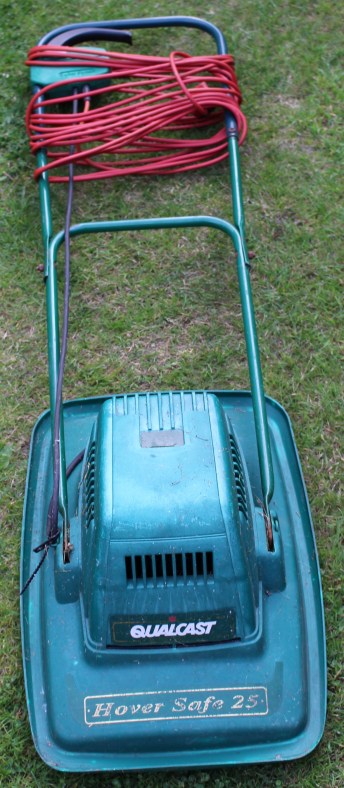
Another email popped in to my inbox asking if I would have a look at a Qualcast Hover Safe 25 which had stopped working.  It had been working intermittently for a while before giving up the ghost and now it had thrown in the towel.  Bad news.  It had literally been kicked into the long grass.

Make and model:  Qualcast Hover Safe 25

Cost of replacement:  £40.00 (ish)

Cost of parts:  £0.00 (plus my time)

Hours spent on repair:  1 (plus testing)

Tools needed:  Basic screw drivers, multimeter, pliers, hair dryer

Sundry items: WD40, silicone spray, wet and dry sanding cloth

Repair difficulty:  4/10
IMG_9652
FixItWorkshop, Worthing, June’19, Qualcast Hover Safe 25.

The owner of this mower had reported that the handle mouted switch (dead-mans handle) had been a ‘bit tricky’ to use and that it didn’t always work.  These kinds of statements make me wonder what kind of life a device has had.  Judging by the rust and discolouration on the metal and plastic parts, I think this mower had been left in a shed with a leaky roof!

This slideshow requires JavaScript.

The water had not been kind and the mechanism had seized.  The only thing to do was to open up the switch, clean up any moving parts, lubricate the switch with switch cleaner and lubricate the sliding plastic parts with a little silicone spray.  The small lever which actuates the main on/ off switch was also slightly bent, so after a little straightening, using a hair dryer, it was as good as new. After the switch was repaired, the lawnmower’s motor still wasn’t working.

The cable running from the switch to the motor housing appeared to be in good condition, so the only thing left was to remove the motor itself.  Removing the motor means removing the blade and 4 small screws (see photos).  Once exposed, the motor was revealed.  Power was indeed reaching the motor when the switch was operated, as confirmed with a quick dab of the multimeter.

The motor itself seemed to have little resistance when manually spun, which led me to suspect the motor brushes had worn out.  Doubting that brushes were available, I decided to remove them anyway for closer inspection.  This revealed seized motor brushes, which backed up my theory about the mower’s damp environment.  A quick bit of jiggery pokery and a clean up and the motor brushes were as good as new.  A quick clean up of the motor commutator, I refitted the brushes and the motor was ready to be refitted.

Now, this mower is not in the first flush of youth and the motor bearings were a little noisy, but after a quick spray of grease in the bearing area it sounded fine.  The mower will never be perfect, but at least it will work for a little longer, which has got to be the point, hasn’t it?

Dyson DC25 with various problems

Another Dyson dodges the dump

An email dropped into my inbox about a poorly Dyson DC25, that needed a bit of a clean up.  I said no problem, I’ll take a look.  What turned up was a vacuum cleaner that needed a bit more than a quick clean up with a J-Cloth.

Make and model:  Dyson DC25 (blue/ grey)

Cost of replacement:  £N/A, price when new £300

Cost of parts:  £6.89 (plus my time)

Hours spent on repair:  2.5 (plus testing)

Repair difficulty:  5/10

It soon became apparent, that the Dyson was quite ill.

Here’s a summary of the problems:

  1. The mains cable flex was split, exposing the internal cables risking electric shock
  2. The roller beaters would not spin
  3. Suction was limited

None of these features were useful in vacuum cleaner, so out came the screw drivers.

The mains flex damage was about 90 cms from the handle end, so rather than replacing the whole cable at about £30, I decided to shorten the one already fitted on the Dyson.  This involved removing three screws on the reverse of the handle to expose the wiring.  From there, the broken flex could be cut-out and the sound part of the flex, reattached to the Dyson’s wiring.  See below.

This slideshow requires JavaScript.

The DC25 features a roller-ball, enabling the beater head to twist and turn in to tight spots on the floor.  This means that mains power must navigate the various joints and hinges on the way from the main body to the roller beaters.  A quick test revealed that the power was not getting through.  After removing one of the side covers, there was evidence of a previous repair.  One of the mains cables had broken and had then been twisted back together.  Clearly, an improvement was needed.  Using a section of repair cable, a small joint was soldered back in to place with some mains-rated heat shrink around the connection for insulation and reinforcement.  See below.

This slideshow requires JavaScript.

The beater head also needed a good clean, which meant a strip-down and re-build.  All parts were cleaned, inspected and reassembled.  During that process, a small break in the beater head wiring was found, repaired and put back together.  See below.

This slideshow requires JavaScript.

Finally, the machine needed a good clean up.  The main cylinder was washed, the filters washed (although I later decided to replace these) and the main seals on the vacuum system, cleaned and silicone sealed.  See below.

This slideshow requires JavaScript.

During clean up, the spigot-yoke that holds the roller ball in place on one side was found to be missing.  Luckily the owner had kept this and dropped it back to me to re-fit.

This Dyson was on the brink, but with a little bit of spanner-time, it’s now ready to serve many more years.


Cold GHD hair straighteners

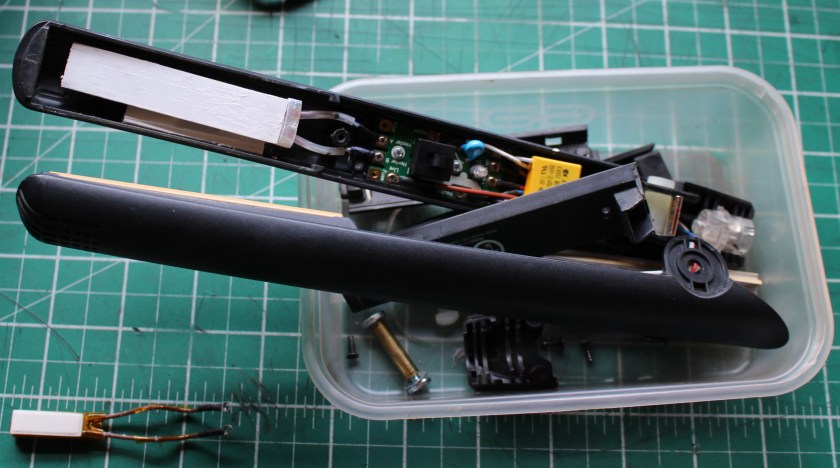
GHD 4.2b hair straighteners with a new fuse.

Someone got in touch with a set of GHD 4.2B hair straighteners, which wouldn’t warm up.  Not even the light would come on.

Make and model:  GHD 4.2b hair straighteners

Cost of replacement:  £85.00

Cost of parts:  £2.89 (plus my time)

Hours spent on repair:  1 (plus testing)

Repair difficulty:  5/10

IMG_9120

 These older hair straighteners are well supported with spare parts and their design means that, with a systematic approach and basic test gear, the fault can be identified and parts replaced, fairly easily.

The thermal fuse on these straighteners can fail, even though the heating elements and associated wiring and circuitry is just fine.  A combination of age and accidental rough handling can affect the life of the fuse, so it was the first thing I checked on these straighteners.

It was first time lucky in this case.  The fuse tested open-circuit.  To prove that the rest of the circuit was working, I made a temporary short circuit to the fuse connection and the straighteners powered up OK.

Time to order a new fuse.  Using an eBay shop (SiriusHairUK), a fuse was ordered and it arrived very quickly, great service.

This slideshow requires JavaScript.

With the fuse re-fitted and the heating element re-installed the rest of the hair straighteners were ready for reassembly.  Using basic tools, the straighteners went back together well and after final testing, they were ready for use again.

Tommee Tippee Perfect Prep Problems

The right formula for a poorly Tommee Tippee Perfect Prep Machine

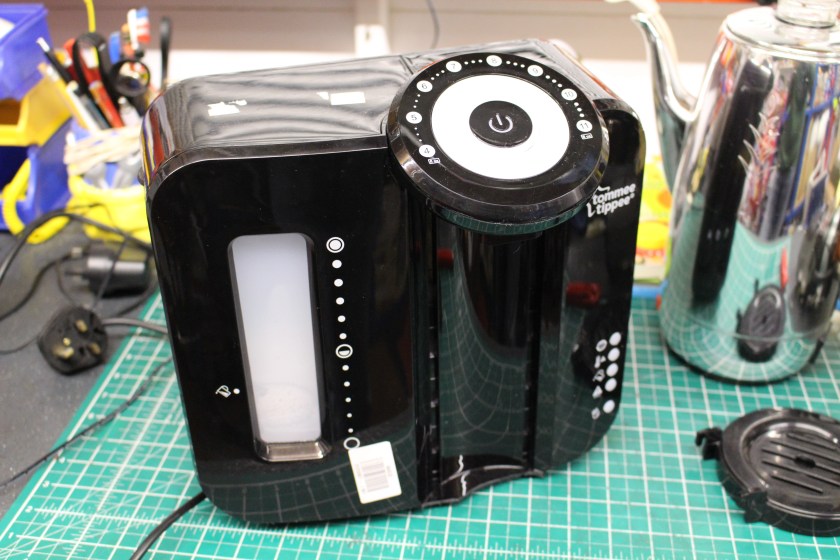
The owner of this Perfect Prep machine had reported that it had not been used for a while, then filled with water, powered up and … nothing.

Make and model:  Tommee Tippee Perfect Prep

Cost of replacement:  £70

Cost of parts:  £3.69 (plus my time)

Hours spent on repair:  1 (plus testing)

Repair difficulty:  6/10

IMG_8972
FixItWorkshop, Worthing, June’18, Tommee Tippee Perfect Prep.

I’ve repaired a machine like this before and I already had a theory about the problem, which went like this:

  • Machine not used for a while; watery scale deposits built-up in machine
  • Machine filled with water, with possible air-lock present
  • Air-lock causes bubble in heater, causing it to temporarily over-heat, safety thermal fuses blow

Dead machine.

At this stage, it was only a theory, so the only thing to do was to start wielding screwdrivers.

A few quick checks revealed that mains power was not getting to the main controller in the machine, which indicated that the safety thermal cut-out fuses had failed.  There are two on this machine.  A quick test with the multi-meter confirmed that both had failed.

After some dismantling, both fuses could be removed from the wiring harness.  Fuses like these are not available from the high street usually, but they are readily available online.  The manufacturer had used crimps to attach the fuses to the wiring, but I decided to solder the new ones back in place.  Care had to be taken as the melting point of solder is very close to the thermal rating of the fuses, so I came up with the idea of using a damp cloth wrapped around the fuse while doing the soldering.  A bit tricky!

Both fuses replaced meant that the unit powered-up and worked.  Great.

However, I wasn’t totally convinced that an air-lock wouldn’t happen again so I looked deeper at the machine’s plumbing.  There appeared to be a kink in one of the boiler tube feed pipes, so I decided to cut some material away, to prevent the pipe restricting water flow in future.

This slideshow requires JavaScript.

All back together, the machine worked well once again.


Dim Lumie Bedbug

Lumie bedbug glows once again.

A short repair tale about a little bedtime bug.

A friend mentioned that their son’s Lumie Bedbug lamp was intermittently working and that it was shortly going to be visiting the bin if it didn’t buck its ideas up.

Er, no I said.

IMG_20190524_142951
FixItWorkshop, Worthing, May’19, Lumie Bedbug.

The bug night light was meant to glow orange, once switched on, but it only lit up when the cable was wobbled about.

The power connection on this model is a standard USB (B) connector, the ones commonly used to charge Android phones.  If the power lead was faulty, it would be easy to find a suitable replacement.

The bug comes apart by removing the silicone outer layer and releasing the tangs holding the two halves of the bug together.  One screw holds the PCB in place and once removed, the whole thing comes to pieces.

The USB socket was a little out of shape, presumably from some rough handling.  A quick nip with a pair of pliers and it was back as it should be.

The plug was also a little out of shape, but with a bit of careful re-shaping, it fitted the socket perfectly.

This slideshow requires JavaScript.

Once reassembled, reconnected and powered up, the bug glowed without flickering.  Result.

Cost of replacement:  £50.  Cost of repair:  One tea and one custard cream, that I made myself.

Gaggia Espresso Machine with a nasty blockage

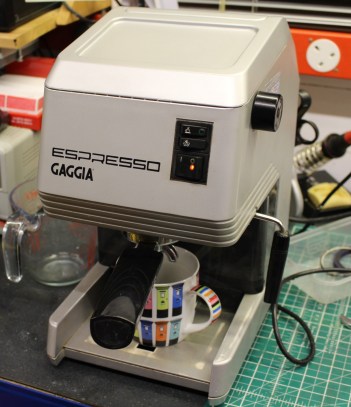
A Gaggia Espresso machine gets a rebuild.

Home coffee machines are very cool.  Home espresso machines are even better as they’re the closest you can get to a coffee shop brew, in my opinion.  Due to heat, water and coffee mixing up on a regular basis, they need ownership with care for long life.

IMG_9039
FixItWorkshop, Worthing, May’19, Gaggia Espresso Machine.

Top tips for longer coffee machine life:

  • Use filtered water, especially if you live in a hard water area
  • Clean the tank regularly
  • Keep all rubber seals, especially those around the main coffee making area, clean with a damp cloth

Someone got in touch with a machine that was a few years old, but had once made a lovely cup of coffee.  The owner had used it daily but recently it had begun to leak and not perform at its best.  The machine had also been to a UK repair specialist, but sadly, they couldn’t solve the problems.  I always test appliances when they arrive to confirm the fault and as expected, water came out of places it wasn’t supposed to.

I’ve worked on a few of these machines, so I know the drill.  Remove the lid, make a note of the wiring connectors, the pipes and remove the bolts holding the main boiler in place.  I also ordered a service kit (new seals) for a reasonable £7.99.

The main boiler separates into two halves which reveals the main boiler chamber and exit for hot water.

This boiler was in poor condition and years of corrosion and scale had built up and was probably blocking the main group head, the bit where you attach the group handle/ filter bit to make coffee.

Time for more dismantling.  The group head is held in position with a couple of screws, but years of corrosion had taken their toll and this head was going nowhere.  Great care was needed as the soft metal is easily damaged.

Thinking about this a bit more, I decided to cut a screw thread into one of the water holes in the head and use a bolt to lever the group head apart.  It worked.  Once off the head revealed loads of debris and scale.

The next job was to give all parts a thorough clean, re-faced with wet and dry paper as needed and use new seals as part of the reassembly.

Once back together, the boiler was reinstalled and reconnected.  After a few blasts of fresh water through the machine, it was ready to make its first proper brew.

This slideshow requires JavaScript.

Cost of replacement:  £100-300.  Cost of repair:  £7.99, my time, one tin of elbow grease, one cup of coffee and a ginger nut.


Qualcast strimmer issues

Always keep your garden tidy.

Top tips for keeping your petrol strimmer running like a ‘Rolls Royce’

  • Make sure the fuel you have in the tank is fresh and not from three years ago (it goes off)
  • Keep the spark plug gap set within the manufacturer’s tolerances
  • Lubricate all moving parts lightly with a generic spray oil each time you use the strimmer
Strimmer
FixItWorkshop, Worthing, May’19, Qualcast Petrol Strimmer.

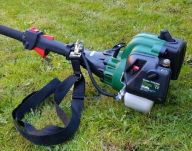
Someone got in touch with a strimmer that would not start.  Anything that involves moving parts and petrol always gets my attention, so I accepted the challenge.  Once in the workshop, I tried to start it using the pull cord and as predicted, it wouldn’t run, not even a cough.  A little bit of carb cleaner sprayed in to the barrel, a pull of the starter cord and the engine did fire, suggesting that the engine could run.  More analysis was required.

The strimmer had not been started for many years, so the first job was to remove the old fuel from the tank as old fuel goes off after a while. The engine on this strimmer is a two-stroke design, so the special two-stroke oil must be pre-mixed with the fuel in the right proportion before re-filling the tank.

While sorting the fuel out, I noticed the first fault.  Both flow and return fuel pipes were cracked and one had come apart in the fuel tank, meaning that no fuel would flow to the carburettor.  No fuel, no work.

To start most petrol strimmers, mowers and chainsaws from cold, a petrol primer pump is usually used to fill the carburettor with the right amount of fuel and this one was no different, but in this case, the pump was cracked.

After fitting some new fuel lines, a fuel filter and primer pump, the engine fired up and ran well again, ready for more garden work.  See slide show.

This slideshow requires JavaScript.

Cost of replacement:  £80 and up.  Cost of repair:  £7.53 plus my time and custard creams.


Smoky Kenwood Chef A901E

Another Chef enters the workshop with a smoking habit that’s hard to kick.

Top tips for keeping your Chef running smoothly, for longer:

  • Keep all moving parts free from dirt and old cake mix
  • If the feet are squashed, change them.  The gap allows airflow to the motor
  • Keep the hinge mechanism lightly lubricated
IMG_9144
FixItWorkshop, Worthing, May’19.  Kenwood Chef A901E (1980’s model)

This A901E Chef had a developed a smoking habit.  Due to age, one of the capacitors had failed on the speed control circuitry making a lot of smoke while in use.  An adjacent resistor had also split in half during the failure.

Despite a smoky situation, there was hope for the Chef.

Removing the motor on these mixers is pretty straightforward.  Just remove the blender accessory power take off cover and remove some screws.  Lift up the top half of the mixer on the hinge and you’ll get access to the base of the motor area.  After you’ve removed the belt, the motor should come out.  There’s a bit more to it actually, but there isn’t much holding that motor in.

The later A901E features a better speed control circuit than the earlier A901 and it’s also made on proper circuit board, rather than just soldered-together components.

With this machine, the correct repair kit was obtained and fitted, so the circuit was as good as new and wouldn’t smoke anymore.

I treated this Chef’s motor to new motor brushes since the old ones were worn.  I also fitted new feet, as the existing ones were squashed and one was completely missing.

I was about to sign the job off , when I noticed a small tear in the outer cable flex.  I couldn’t let the Chef out of the workshop like that, so I had to replace it with a new piece.

This slideshow requires JavaScript.

After some fettling, the machine was running like clockwork, once again.

Cost of replacement:  £000s.  Cost of repair:  £12.74 plus my time and several ginger nut biscuits.

A bit of 70’s fun: Sona J996 Coffee Percolator

An office find, escapes the scrap yard.

Despite the 1970’s kitsch-ness of the electric percolator, they are very good at making coffee and the delightful coffee smell you get when brewing-up is sublime.  Here’s an advert from the time.

Top tips for keeping your coffee percolator in good order:

  • Descale using a kettle descaling solution as needed
  • Keep the coffee strainer clear of debris
  • Make sure the lid always fits between the strainer and the percolator body

A colleague found this percolator while clearing out an abandoned office cupboard.  I suspect that this one might have been bought as a wedding present way back and had ended up in the office when someone had decided play the role of barista at work.

It was missing its power lead and was headed for the recycle bin, when I intervened.

The power lead needed was an obsolete design used on British appliances of the era and was similar in design to the more modern and current, IEC C13 or ‘kettle lead’.  However, modern kettle leads did not fit this percolator.

More drastic action was needed.  Luckily, I had an old appliance I no longer needed, so I scavenged a board mounted IEC C13 socket from it and replaced the one originally fitted.

After some soldering and a bit of jiggery-pokery, this Sona Percolator now brews coffee using an up-to-date power lead.

This slideshow requires JavaScript.

Cost of replacement:  £40.  Cost of upgrade: £0.

A Dyson DC34 Animal dodges the bin

A repair and top tips for keeping your Dyson DC34 running for longer.

Every home should have one of these hand held dust busters.  Simple as that.

IMG_8853
FixItWorkshop, Worthing, May’19, Dyson DC34 Animal.

Why?  Because they are easy to use, easy to clean and last ages on a charge.

Top tips for keeping your Dyson DC34 running for longer

  • Keep the filter cleaned (wash regularly)
  • Remove any build-up of hair from the roller beaters
  • Keep all electrical connections clean (use WD40 or similar)

This one was admitted to the workshop with one fault, but the diagnosis revealed two problems.

When in use, the roller beaters would stop frequently and not restart.  The cure for this problem was to remove all the hair from the roller spindles and the internal motor belt drive, which was held together with a couple of screws.  Once all the hair was removed, the rollers worked much better, but not perfect.  A quick blast of air and a quick spray with contact cleaner into the motor and the rollers were once again, working as they should.

This slideshow requires JavaScript.

On a full charge, one of these Dysons should run for about 20 minutes, but this one didn’t.  The battery wasn’t holding the charge, so after a quick look online, a new one was purchased for just under £20.  Great value.

It felt really good to save another product on its way to the bin.

Cost of replacement:  £200.  Cost of repair:  £20, plus one cuppa, ginger cake and ice cream.